

Particles |  |
CHARGE has two options for excitations sources. The first being a particle source, second being a GEO Electron.
 Particles
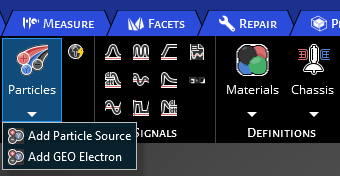
Locate the Particles option and choose between Add GEO Electron or Particle Source.
A properties menu will appear along with the Particle Source within the structure tree.
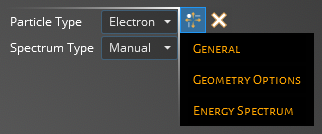
The following tables contain information on the possible parameters for General, Geometry Options, and Energy Spectrum. What is included in each subsection is determined by the Particle Type and Spectrum Type. The Particle Type can change the parameters in General, while Spectrum Type changes the parameters in Energy Spectrum. To see a full list of options for each access the drop down menu in the properties interface.
- General
Entry
Meaning
Number of Particles
Enter the number of particles used per time step used for the Particle Tracking feature
Number of Time Steps
The number of time steps the source will be active, with the time step length defined in the Domain
Atomic Number
Set the atomic number for the Ion particle source
Nucleon Number
Set the nucleon number for the Ion particle source
Charge [e]
Set the charge value for the Ion particle source
Nuclear Excitation [MeV]
Set the nuclear excitation for the Ion particle source
- Geometry Options
Source Geometry
Parameters
Boxed
Allowing for mono or bi-directionality along X, Y or Z axis:
+ X, Y, Z- True enables flux in direction, False disables
- X, Y, Z- True enables flux in direction, False disables
Cylindrical
Plane- Select the plane the source will be normal to:
Divisions- set the number of divisions to use for the cylindrical source
Spherical
Incidence Type- Select either focused or Isotropic:
Isotropic- Particles travel in all directions
Focused- Particles travel radially towards origin
Planar
Plane- Select the plane the source will be normal to
Direction- select either the + or - direction in the plane axis chosen
Charge Density
Set the Ion charge density
- Energy Spectrum
Entry
Meaning
Spectrum
Import spectrum file
Current [A/m2]
Set the current that will be used for a single time step in the spectrum file
Energy Spectrum
Set energy levels and the corrisponding fluence
Integral Flux Time [s]
Time adjustment made to the manual entry of energy bins
Spectrum Energy [MeV]
Set the energy that will be used for a single time step in the spectrum file
Satellite Name
Satellite to be imported from SKT
SKT Particle Source
Generate Particle Source from SKT data
In Sync
Has particle source been synced with SKT
See AlsoOther Resources
EMA3D - © 2026 EMA, Inc. Unauthorized use, distribution, or duplication is prohibited.